
From invoice to approved bill, without the paper chase.
Verus captures supplier invoices, codes them, matches them to purchase orders, routes them to the right approver and hands clean bills to your accounting system, with every step on the record.
Now onboarding pilot customers. Built for small and mid-sized businesses.

Everything between “invoice received” and “bill entered”
One workspace for the whole AP routine, so your team stops re-keying invoices and chasing sign-offs by email.
Invoice capture with AI
Upload a PDF or image and the fields fill themselves. The original is stored first, so a slow or failed read never loses a document. Exact and business duplicates are flagged before they cost you money.
Intelligent, Fast GL coding
Suggested accounts come from the purchase order, supplier defaults and history. Split one invoice across accounts in a compact grid, even with dozens of lines.
PO matching, only if you need it
Compare invoice, purchase order and goods receipt side by side, with exceptions called out. Companies without POs get a simple route with a written business reason.
Independent approval
Set limits by role and by supplier. Preparers can't approve their own invoices unless you allow it. Send back, hold or reject, always with a reason.
QuickBooks Online sync
Approved invoices become QuickBooks bills automatically, linked to their POs, with the original attached. Payments made in QuickBooks flow back and the invoice archives itself.
Card reconciliation & CSV handoff
Reconcile credit-card statements in the same workspace. Using a different ERP? Export one clean row per GL line and record the reference you entered.
How it works
A clear path with one next step at each stage.
- CaptureUpload an invoice; AI OCR reads it.
- Verify & codeCheck the fields, pick the account, press Verified.
- MatchTie to the PO and receipt, or take the no-PO route.
- ApproveThe right person approves within their authority.
- Enter & payBill goes to QuickBooks or CSV; payment is recorded.
Built around how AP really works
Three controls that keep invoices accurate, authorized and traceable.
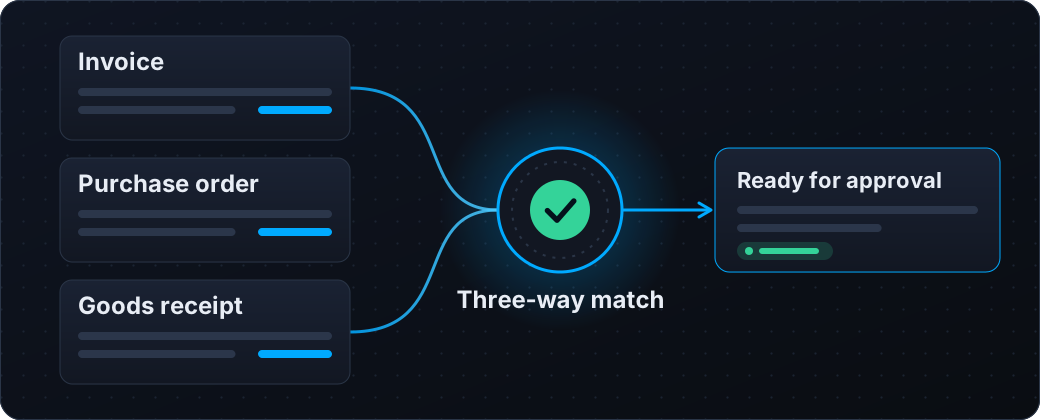
Match invoice, PO and receipt automatically
Verus compares the three documents line by line and tells you plainly whether they agree. When they do, the invoice moves straight to approval. When they don't, the exceptions are spelled out so nothing slips through.
Approvals within the right authority
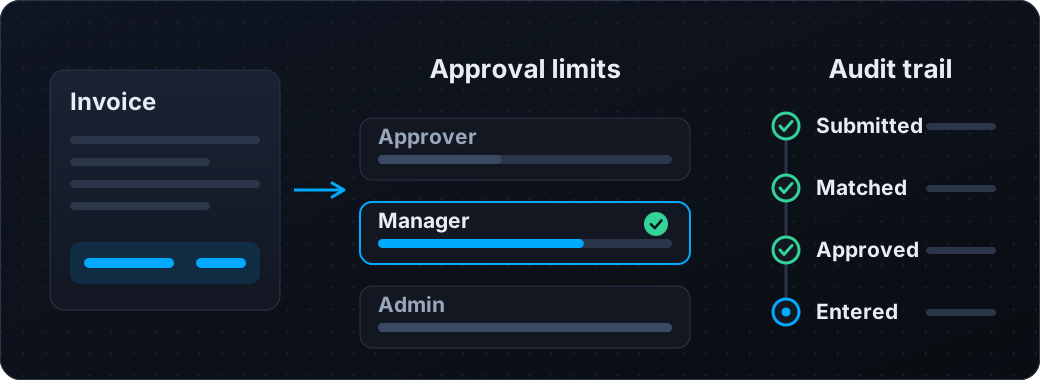
Set approval limits by role and by supplier. Approvers act only within their authority, and every step from submission to entry is recorded with who did it and when.
Controls your auditor will like
Verus is built so the process is hard to get wrong, and easy to prove afterwards.
- Approval authority is enforced by the server, not just the screen
- Every financial change is recorded with who, when and why
- Multi-factor authentication for pilot customers
- Each company's data is isolated from every other company's
- Verus never moves money or posts to your books without your approval
Built for the way you buy
The same controls, shaped around your industry.
Want to see it with your own invoices?
We're onboarding a small group of pilot customers. Tell us a little about your AP process and we'll be in touch.
Request pilot access