
Handle high-volume purchasing without growing your AP team.
Many suppliers, constant replenishment and tight margins. Verus checks every invoice against what you ordered and received, catches duplicates before they're paid and keeps due dates in front of you.
Where AP gets hard in distribution
The volume is the challenge: lots of invoices, lots of suppliers and very little slack.
Invoice volume that never lets up
Constant replenishment means a steady stream of invoices from many suppliers, each needing to be checked and coded.
Duplicates and re-sent invoices
Suppliers resend invoices and statements. Paying one twice is an easy mistake and an expensive one.
Short and over shipments
What the dock counted doesn't always match the PO or the invoice, and someone has to notice.
Due dates that sneak up
Late payments hurt supplier relationships and can cost you terms. Early ones tie up cash.
The distribution workflow
The same checks on every invoice, so volume doesn't mean shortcuts.
- Upload in bulkDrop in several invoices at once. Each original is stored first, so a slow read never loses a document.
- Catch duplicates up frontExact duplicate files are recognised. Likely duplicates are flagged for a manager to clear, with a reason.
- Verify and code fastSupplier defaults and past coding suggest the account. Check it against the original and press Verified.
- Match to the PO and receivingQuantity and price are checked against the PO and what was received. Short shipments and price differences are called out.
- Approve and enterApprovers act within their limits. Approved invoices become QuickBooks bills, and payments flow back.
Every invoice through the same checks
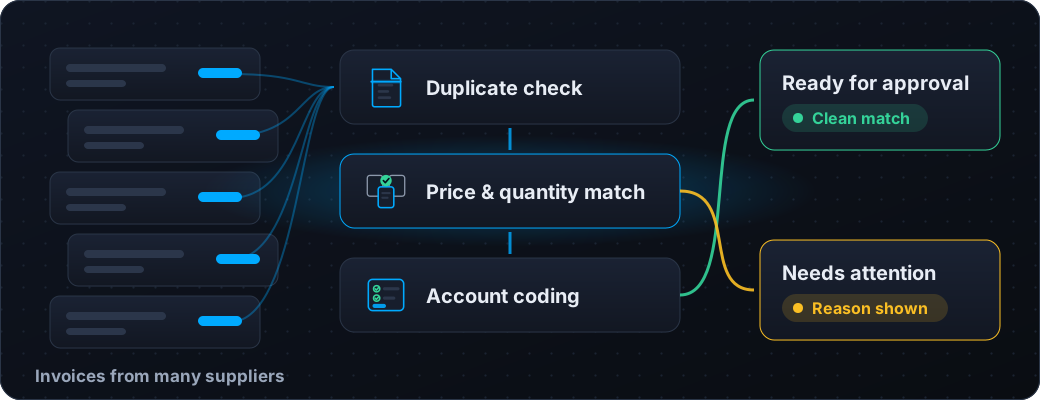
Verus runs each invoice through duplicate detection, price and quantity matching, and account coding. Clean matches move straight to approval. Anything that doesn't line up goes to a queue with the reason shown, so your team spends its time on the exceptions, not on re-checking the routine.
- Exact and business duplicates flagged before approval
- Price and quantity compared with the PO and receipts
- Short shipments shown as quantity not yet received
- Supplier-default accounts speed up repeat purchases
Stay ahead of due dates
The invoice inbox flags what is overdue, due today and due within the next seven days, with counts on each tab. Sort by due date and the next invoice to pay is always at the top.

Connected to your books
Verus sits in front of your accounting system and hands it clean, approved bills.
QuickBooks Online sync
Approved invoices become QuickBooks bills automatically, linked to their purchase orders, with the original attached.
Payments flow back
Pay the bill in QuickBooks and the invoice shows as paid in Verus and archives itself.
CSV for other systems
Export one clean row per GL line, then record the reference once the bill is entered in your system.
Card statement reconciliation
Reconcile purchases made on company cards in the same workspace as your supplier invoices.
What Verus gives your warehouse and your finance team
Fewer manual checks, fewer surprises and a clear record of every decision.
- Duplicate detection on files and on business details
- Three-way matching against POs and receiving
- Service receiving for completed services and non-stock lines
- Approval limits by role and by supplier, with independent sign-off
- A full audit trail of who did what and why
- Verus never moves money or posts to your books without approval
Buying at volume?
Tell us how many suppliers and invoices you handle and we'll show you how Verus would take on the routine checks.
Request pilot access